GPS Controller Video Telematics Provides Instant Evidence to Resolve Hit-and-Run Claims for Logistics Fleets
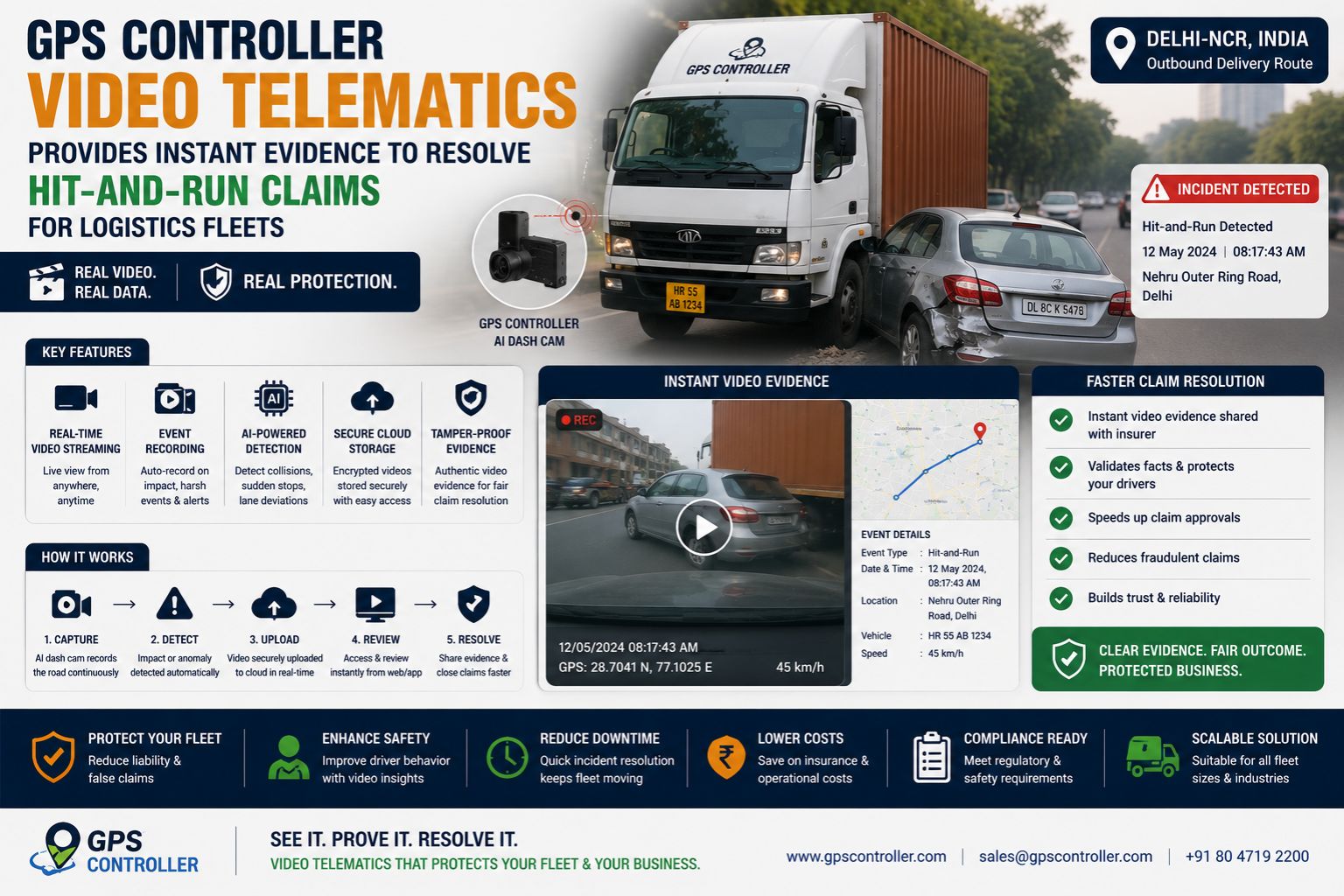
GPS Controller Video Telematics Provides Instant Evidence to Resolve Hit-and-Run Claims for Logistics Fleets
For logistics fleets, a hit-and-run incident often escalates into weeks of finger-pointing and rising insurance premiums because the only available evidence is a driver statement. GPS controller video telematics closes this gap by automatically syncing a camera trigger with the vehicle’s location data, giving fleet managers verifiable visual proof that can immediately counter false claims or confirm fault without relying on third-party witnesses. The difference between a settled claim and a liability nightmare is whether the system captured the moment before the driver knew to report it.
How Video Telematics Eliminates Dispute Gaps in Fleet Operations
The core problem with traditional GPS tracking in hit-and-run scenarios is that it only records coordinates and speed, not what actually happened outside the cab. Video telematics solves this by pairing dash cameras with the vehicle’s telemetry unit, so when an impact or sudden brake event occurs, the system automatically saves a video clip from ten seconds before the event and ten seconds after. This means a fleet manager reviewing a claim sees the other vehicle swerving into the lane, not just a dot on a map showing a sudden stop. The key operational detail here is that the trigger threshold must be calibrated to the fleet’s vehicle type—a heavy truck’s vibration profile differs a lot from a light delivery van, and a misconfigured sensor will either miss impacts or generate false alerts that bury real evidence in noise.
The Reality of Data Latency and Evidence Retrieval at Fleet Scale
When a fleet operates fifty or two hundred trucks, the volume of telemetry data becomes a challenge because retrieval delays can erase the evidence window before it is locked. Video files are large, and if the system relies on cellular uploads at end-of-shift, that critical clip may sit in the camera’s buffer until the driver returns to the yard, which is too late if the insurance adjuster calls first. The boundary condition here is that real-time upload capability depends on network coverage, and fleets running routes through rural corridors often experience signal dropouts that prevent immediate cloud upload. One fleet manager learned this the hard way when a clean video clip sat on a camera for six hours because the truck was parked in a basement loading dock with no cellular connectivity, and by the time the clip reached the server, the claimant had already filed a police report based on a fabricated story.
Common Mistakes That Break the Evidence Chain in Hit-and-Run Cases
The most common mistake is assuming that any dash camera automatically provides usable legal evidence, but the reality is that standard consumer cameras lack the integration with fleet tracking software needed to timestamp video against GPS coordinates. Without that geofence-triggered alignment, an adjuster can challenge whether the video actually matches the reported claim location. Another frequent failure involves compliance logs, because if the video evidence contradicts the electronic logging device (ELD) data, the fleet opens itself to regulatory scrutiny on top of the insurance dispute. The non-obvious detail is that the video resolution must be high enough to capture license plates at highway speeds, and many fleets deploy cameras with insufficient frame rates that render plates as blurry streaks, effectively making the evidence worthless for identification purposes.
Decision Help: When Internal Adjustment Mechanisms Fail Against Fraudulent Claims
The decision point is whether to continue relying on manual driver reports and third-party witness accounts or to redesign the evidence pipeline by deploying integrated video telematics that automatically archives event clips to a secure, unalterable storage location. If a fleet is experiencing more than three disputed hit-and-run claims per quarter with no visual proof, the internal workflow of asking drivers to submit dash cam footage after the fact is insufficient—human memory degrades within hours and drivers may not know which incident triggered the alert. Tuning the system involves reconfiguring the vibration sensitivity thresholds, but once the number of false positives from potholes or road debris exceeds fifty percent of recorded clips, the internal fixes stop working and the fleet must replace its camera hardware with units that have artificial intelligence-based event classification to filter out non-incident footage. The boundary is clear: when false positives waste more than two hours of fleet manager time per day reviewing irrelevant clips, the existing system is a liability, not a solution.
FAQ
Question: Does GPS controller video telematics automatically save footage when an accident occurs?
Answer: Yes, when the system detects a predefined trigger such as a g-force impact or sudden deceleration, the video telematics unit saves a clip starting several seconds before the event to provide full context for hit-and-run claims resolution.
Question: How long is the video evidence stored on the camera or in the cloud?
Answer: Storage duration depends on the fleet configuration, but most systems retain critical event clips for at least thirty days while continuously overwriting continuous loop footage to manage storage capacity and compliance logs.
Question: Can telematics video be used as legal evidence in insurance disputes?
Answer: Yes, if the footage is securely timestamped and linked to GPS location data, it qualifies as admissible evidence, provided the camera resolution is sufficient to show identifying details like license plates and vehicle damage.
Question: What happens when a fleet operates in areas with poor cellular signal for video upload?
Answer: In areas with weak signal, the video data is stored locally on the camera’s memory until the vehicle returns to network coverage, which can introduce evidence retrieval delays that the fleet must account for in its claims response workflow.


Comments
Post a Comment